Note: This English version was created with the help of automated translation and I am not a native English speaker. If you notice any unclear or incorrect wording, feel free to point it out in the comments or reach out via e-mail so I can improve the text.
Long story short
Do you work in IT security, or are you simply interested in it and occasionally stay in Airbnb flats? Next time, take a look at the router and check the basic security measures. If they are not in place, fix them and/or tell the Airbnb host.
Everything below is the “long story”…
A weekend trip to Ticino
Not long ago I spent a weekend in Ticino, in Ascona to be precise, and rented an Airbnb there. Only a beautiful promenade lined with restaurants separated the flat from the lake. There was nothing to complain about in the flat either. I can recommend Ascona, and Ticino in general, to anyone. Just start walking and see where it takes you, because there are wonderful places you will not find on Google Maps.

The missing password (fancy wording: the vulnerability)
My plan was to take out my laptop at most for a film in the evening. But then, while connecting to the Wi-Fi, I noticed the label on the back of the router (a Wi-Fi router, strictly speaking): Default Access: http://tplinkmodem.net. So much for my good intentions…
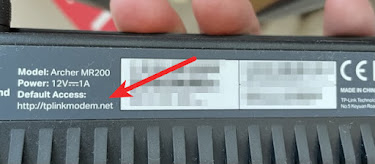
Of course I could not resist having a look at what that URL would let me do. I expected a standard login screen asking for a username and a password. In that case I would have left it alone (I did want to relax, after all). And it was indeed a standard screen, except that it asked me to choose a new password and confirm it.
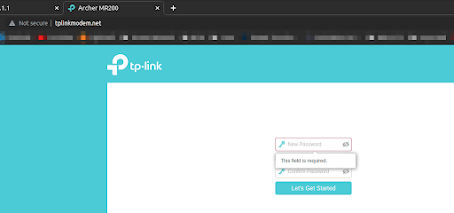
The problem
You might be wondering: why is that a problem? Good question, let me try to explain.
The router web interface
What I reached through the address “http://tplinkmodem.net” is the router’s web interface. Every Wi-Fi router (or plain router, access point and so on) offers a web interface for configuration. Here are some examples of what can be configured there:
- Setting the Wi-Fi name and password
- Setting up a VPN (virtual private network)
- Prioritising devices
- Locking devices out (block and allow lists)
- Enabling power-saving mode
- Setting up a guest Wi-Fi
- and so on
If the router’s web interface can be reached without a password (or, in my case, nobody had ever set one), then everyone who connects to that Wi-Fi has full access to the router’s settings. Since the router almost always holds the first IP address of the address range, the web interface is found quickly even without tools such as nmap. At home, your router is very likely at 192.168.1.1. As listed above, today’s routers can be configured in many ways, which can lead to serious problems. Here are just a few ideas of what could be done with a bit of criminal energy:
- Misconfigure the router so that it stops working.
- Give your own devices priority.
- Create a MAC address allow list so that only your own devices can connect.
- Set up a VPN so that you can later route your own traffic through the Airbnb flat’s internet connection.
- Route all traffic through an intermediate point so that it can be read (man in the middle).
- and so on
Points 4 and 5 in particular can land the Airbnb host in legal trouble, because through the VPN I would have set up I could launch an attack against someone else. To the person being attacked it would look as if the Airbnb host were running the attack. (Put very simply.)
The fix
So what do you do in a situation like this? You certainly do not want to go too far and get yourself into trouble.
I decided to follow the quick setup guide and set a password for the router’s web interface. While I was at it, I also updated the firmware.
I did not change any of the other settings I would configure in my own Airbnb flat, if I had one.
The report
Finally I wrote a message to the host explaining what the problem was, why it is a problem, and that I had fixed it. I also described how to change the password again so that even I would no longer have access to the router.
I wrote that message in the simplest words I could, so that someone who (evidently, sorry…) has no IT background would understand what I had done.
I closed with my e-mail address and a note that he was welcome to contact me with further questions. I think giving a contact address matters in order to come across as trustworthy. In my case he already had it from the booking, of course…
The host replied very quickly with a thank you and a note that he would change the password when he got the chance.
Conclusion
With this short blog post I would like to encourage you, as a reader, to check the network and above all the router for the most basic security measures during your next stay in an Airbnb flat (or anywhere else), and to report them and/or implement them right away if they are missing.
The whole thing (this blog post aside) took me about 30 minutes, and one more insecure network has become a little safer. In the end, every network that meets basic security requirements is one less network from which attacks on companies, private individuals, journalists and others can be launched.
What would you have done in my situation? And what other ideas do you have (purely hypothetically, of course) about what someone could have done with a bit of criminal energy?
Comments
Comments are powered by Giscus. You need a GitHub account to comment.
Don't want to use GitHub? You can also send me feedback directly via email.